Issue:
When using Geo-Replication in Azure SQL Database for disaster recovery, there can be latency spikes and connection timeouts during planned or unplanned failovers between the primary and secondary regions. Failovers can result in data synchronization delays or connection drops, especially if the application is not designed to handle regional failovers seamlessly.
This issue becomes critical when you need a high-availability database architecture with minimal downtime for applications that depend on real-time data.
Solution:
Enable Auto-failover Groups:
Instead of manually handling geo-replication, use Auto-Failover Groups, which automate the failover process and provide seamless connection redirection. This reduces latency during failovers and ensures that applications can reconnect to the new primary region automatically.
To configure Auto-failover Group, Go to Azure Portal –> Navigate to Azure SQL Server –> Data Management–> choose failover groups.
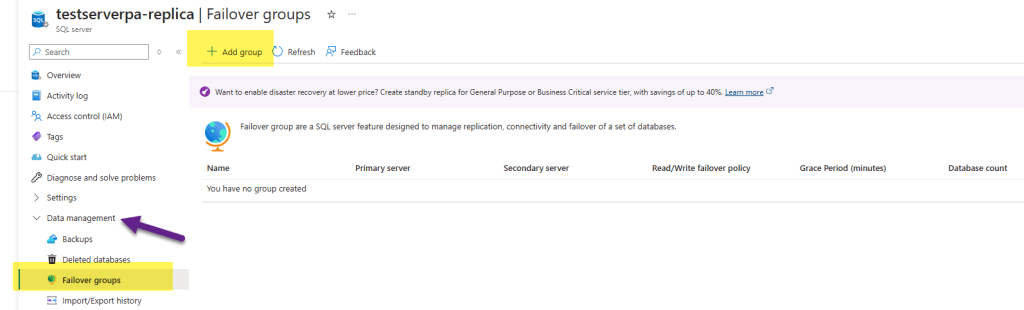
Now setup a failover group with your primary and secondary databases, and configure the failover policy (automatic or manual).
Use Retry logic in Application Code:
Implement robust retry logic in your application’s connection string to automatically handle failover scenarios. During a failover, your application might experience a brief period of connection loss. By adding retry policies to your database connections, the application can re-establish the connection once the failover completes. In .NET, for example, you can use the SqlClient library’s built-in retry logic.
SqlConnection connection = new SqlConnection(“<connection-string>”); connection.OpenWithRetry();
Monitor Failover Lag:
Use Azure Monitor and Log Analytics to track replication lag between the primary and secondary regions. Ensure that data replication is up-to-date before initiating a manual failover, especially during maintenance or disaster recovery drills.Run the following query to track replication lag in a geo-replicated database:
Query to track replication lag in geo-replicated primary and secondary databases. Before initiating failover, it is always recommended to validate data synchronization.
SELECT * FROM sys.dm_geo_replication_link_status WHERE secondary_replica_state_desc != ‘CATCH_UP’;
Happy Learning 🙂
 Padma Achanta's Insights on Database Technologies