Terraform’s core configuration typically consists of three key files: main.tf, variables.tf, and outputs.tf. These files serve distinct purposes within the infrastructure-as-code framework. Here’s a brief overview of each file’s role in a Terraform project.
main.tf
The file named main.tf serves as the primary configuration document for defining the infrastructure you intend to establish. This file encompasses the specification of various resources, such as virtual machines, networking components, storage facilities, or any cloud-based services that incorporate code.

The file extension .tf denotes a Terraform configuration file, indicating that the document contains Terraform-specific code or instructions.
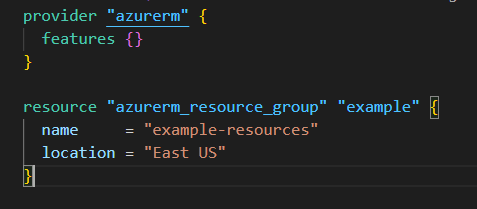
By organizing your infrastructure as code within main.tf, you gain the ability to version control your infrastructure, enabling easier collaboration and tracking of changes over time. This approach also facilitates the creation of reusable modules, allowing for more efficient and scalable infrastructure management across different environments or projects. Additionally, using a centralized configuration file like main.tf promotes consistency and reduces the likelihood of configuration drift, ensuring that your infrastructure remains in sync with your intended design.
variables.tf
The variables.tf file serves to improve the flexibility of your Terraform code by defining input variables. Rather than providing fixed values for elements such as names, regions, credentials, or sizes directly into your configuration, you can establish variables in this file and incorporate them into your setup. This is how variables.tf file looks like.

In this variables.tf file, variables for the resource group name and location are declared, which can then be referenced in main.tf.
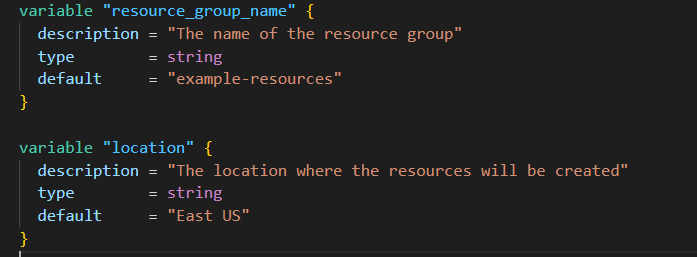
Variables can be assigned default values, which will be used if no value is explicitly provided. They can also be marked as required, forcing users to provide a value before applying the configuration. Additionally, variables can have type constraints, ensuring that only valid data types are accepted as input.
output.tf
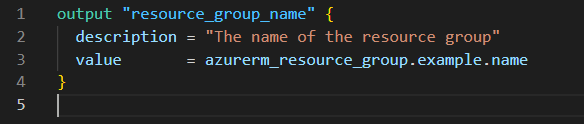
The output file serves to specify values that Terraform will display following the deployment of your infrastructure. This functionality is valuable when you need to view output of the variables such as IP addresses, resource identifiers, or other crucial details that may be required for subsequent use.
This is how output.tf file looks like.

This example shows an output that will display the name of the resource group after the deployment is complete.
These output values can be easily accessed and utilized in other Terraform configurations or external scripts, enabling seamless integration with other tools and processes. Additionally, outputs can be customized to include specific attributes of resources, making it easier to track and manage complex infrastructure deployments. By leveraging output files effectively, you can enhance the visibility and manageability of your Terraform-managed infrastructure.
Happy Learning 🙂
 Padma Achanta's Insights on Database Technologies