Terraform is a powerful Infrastructure as Code (IaC) tool that simplifies managing and provisioning cloud infrastructure. If you’re new to Terraform, here are some basic commands to help you get started.
terraform init
Before you can use Terraform, you need to initialize your working directory. This command sets up the environment, downloads necessary provider plugins, and configures your backend. init stands for initialize.
Terraform init command sets up the working directory.
Command: terraform init
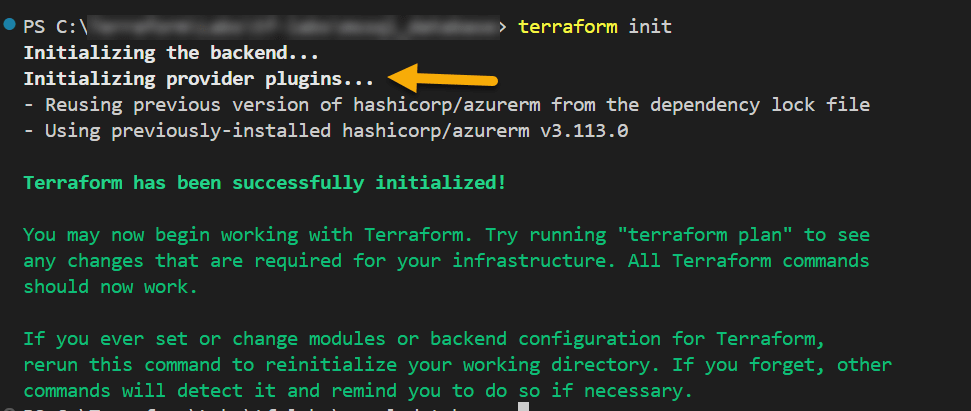
When you run terraform init, Terraform looks at your configuration files for the providers you’ve specified (e.g., AWS, Azure, etc.) and one of the key tasks it performs is downloading provider plugins. Provider plugins allow Terraform to interact with the different cloud services, platforms, or APIs you want to manage, such as AWS, Azure, Google Cloud. If Terraform detects that the necessary provider plugins are not available locally or if the version specified in your configuration differs from the one available, it downloads the required provider plugin from the Terraform Registry or another specified source.
The provider plugins are typically stored in the .terraform directory within your project. This directory is created during terraform init.
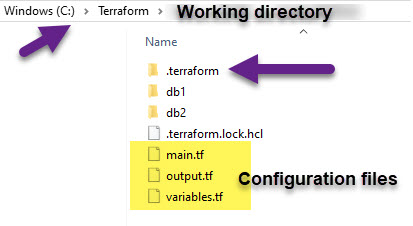
By default, Terraform downloads provider plugins from the official Terraform Registry (registry.terraform.io). However, you can configure Terraform to use private registries or a local mirror if needed.
Happy Learning 🙂
 Padma Achanta's Insights on Database Technologies