One essential command in Terraform’s workflow is terraform apply, which helps you create or update cloud resources automatically. Let’s break down what it does and why it’s important.
After you’ve written your infrastructure code in Terraform (those .tf files), you’ll need to actually create or change the resources defined in that code. That’s where terraform apply comes in. when you run terraform apply, it reads your code to understand the resources you want, prepares a plan showing what changes it will make compared to the current state of your resources. Apply the changes, whether it’s creating new resources, updating existing ones, or even removing resources which are no longer needed.
Here is the terraform apply command to create resource group in Azure.
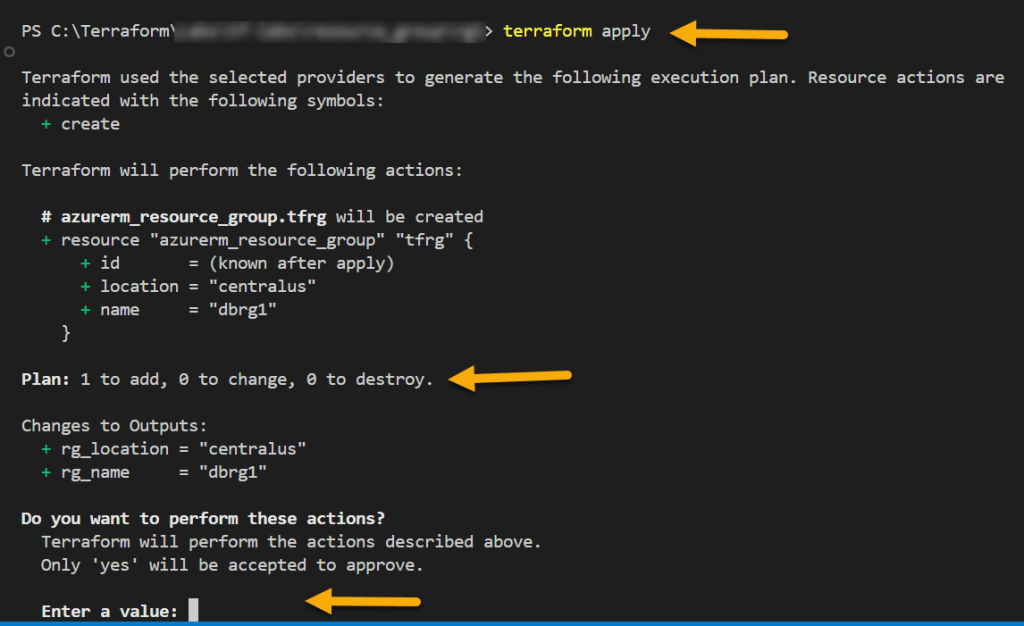
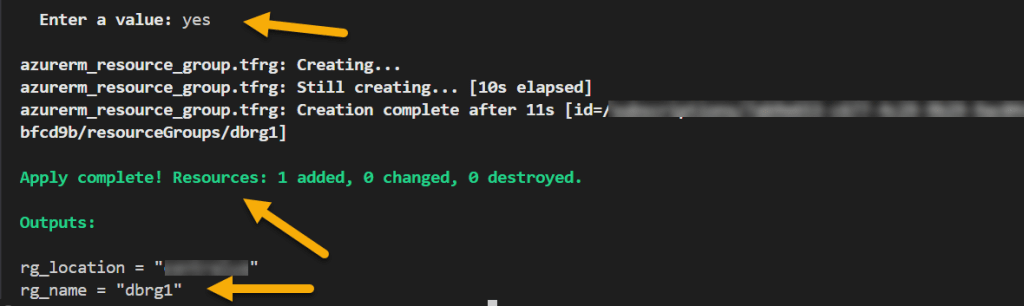
You can also provide terraform apply -auto-approve to apply changes without having one more manual approval. Be cautious while you are using -auto-approve flag especially in production. If you unintentionally apply changes without reviewing the plan, that could affect critical resources. Always ensure code is well-tested before automating the approval.
If you reapply the code without making any changes, Terraform will simply compare your current infrastructure state which is stored in state file with the desired state defined in your configuration files. Below message appears if no changes exists.

Happy Learning 🙂
 Padma Achanta's Insights on Database Technologies